Blog · Editing
What is retention editing on YouTube?
By Tomás Castaño · November 10, 2026 · 6 min read
Retention editing is editing with one question in mind: will the viewer keep watching? It is not fast cuts or constant effects. It means removing what slows the video, changing the image when the idea changes, and reading the retention graph in YouTube Studio to see where people left and why.
There is a kind of video you have seen a hundred times. The image changes every two seconds, a sound effect lands on every sentence, words fly in from the sides, and the whole thing feels like it is afraid you will blink. That style has a name people use for it: retention editing.
I think the name is right and the style is wrong. Keeping people watching is the whole job. Shouting at them is one way to try, and it is the tiring one.
What does retention mean on YouTube?
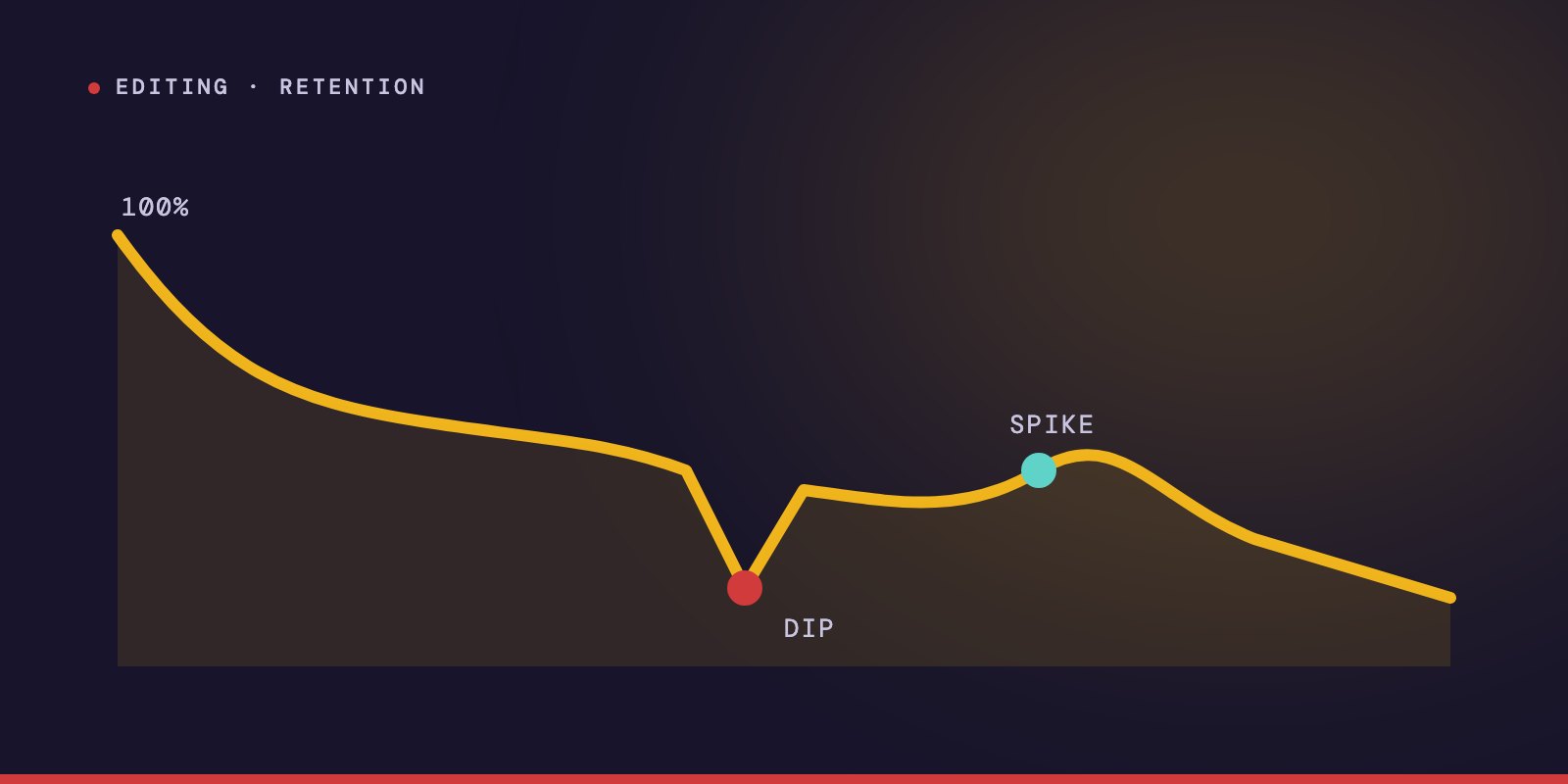
Retention is how much of your video people actually watch. YouTube measures it for every video and draws it as a line: at the start, everyone who clicked is there, and as the seconds pass the line goes down as people leave.
It matters because of what it tells YouTube. The company has explained how its recommendation system works: it looks at clicks, watch time, survey responses, sharing, likes and dislikes to learn what viewers find satisfying. Watch time is on that list, and retention is where watch time comes from.
For six years I was part of the team behind two finance channels. Those were long videos about central banks and debt, and in that time people watched more than 20 million hours of them. Nobody sits through a long video on monetary policy because of sound effects. They stay because the video is easy to follow and keeps paying them for their attention.
What is retention editing?
Retention editing is every decision an editor makes so the viewer does not leave. That is the honest definition, and it is much wider than the style.
It includes the cut that removes four seconds of hesitation. It includes the chart that appears exactly when the number is said. It includes the chapter title that tells you the video is moving forward. And it includes the decision to hold a shot for fifteen seconds because the person is explaining something step by step and a new image would only interrupt.
All of those keep people watching. Only some of them are fast.
Why "cut every three seconds" is bad advice
The rule gets repeated because it is easy to teach and easy to check. Change the image every three seconds and the screen stays busy.
And yet nobody speaks in three-second blocks. A guest can spend eight seconds building up to one idea and then land it in four words. If I cut by the clock, the image changes in the middle of the build-up, and the viewer's eye goes somewhere else right when they should be listening. Or the important line arrives and the screen still shows the picture from before, because the three seconds were not up.
So I do not cut by time. I cut when something changes:
- I cut when a new idea begins.
- I cut when the speaker leans on a point and says it again.
- I cut when the emotion in the voice changes.
- I cut when the sentence reaches the moment it was walking toward.
Sometimes that is two cuts in four seconds. Sometimes it is one shot for a quarter of a minute. The cuts follow the meaning, not the clock.
Film editors were saying this long before YouTube. I wrote about what Walter Murch puts first in a cut.
How to read the YouTube retention graph
You will find it in YouTube Studio, inside the analytics of each video. The line slopes down. What you are reading is its shape. The readings below are how I interpret it after years of looking at these graphs. The official definitions come right after.
- A steep drop in the first seconds. The opening did not match what the title and thumbnail promised. People clicked, looked and decided this was not it.
- A sudden cliff in the middle. Something specific happened at that timestamp. Go there and watch it. Usually it is a tangent, a slow explanation, or a sponsor read that looks like a pause in the video.
- A slow, steady slope. This is normal. Every video loses people gradually. A gentle slope means the pacing is working.
- A bump upward. People rewatched that part or shared it. That is the moment your next hook should come from.
- A drop near the end. You said goodbye. The moment a video sounds like it is ending, people leave, so the last useful thing should come before the farewell.
What YouTube itself calls these moments
You do not have to guess at the names. YouTube's own help pages describe four key moments for audience retention:
- Intro: the percentage of viewers still watching after the first 30 seconds.
- Top moments: points where almost nobody left.
- Spikes: parts that were rewatched or shared.
- Dips: parts that were skipped, or where people stopped watching.
YouTube adds two things worth remembering. A gradual decline is normal, because every video loses viewers as it plays. And if your top moments come late, the advice is to move that kind of material earlier, since fewer people are still there to see it.
What is a good retention rate?
Every guide gives a different number, and they come from creators and tool makers, not from YouTube. I would not chase a percentage.
A two-minute video and a ninety-minute interview cannot be judged by the same figure. The comparison that helps is your own channel: this video against your other videos of similar length. It is the only benchmark that is about your audience.
How to edit for retention, in order
This is the order I work in. Each step removes one reason to leave.
Clean the dialogue first. Silences, filler words, repeated takes and throat clears go out before anything else. A conversation that flows from the first minute gives the viewer no easy moment to quit.
Give the video chapters. Each one opens with a title card and a new piece of music. The viewer feels the video moving forward and stops checking the clock.
Show what is being said. When the speaker names a figure or an event, it goes on screen at that second. People leave when they are asked to imagine a hard idea for too long.
Fill the empty stretches. When someone tells a story that nobody filmed, I build the image: an illustration, a comic, an animation. Three minutes of an unchanging face is three minutes of chances to leave.
Build the hook last. The opening is made from the finished video, not written before it. Here is how I build it, step by step.
Does retention editing mean more effects?
No, and this is where the popular style misleads people.
Effects are a cost. Every zoom, every sound, every animated word asks the viewer for a little attention. Spent on the right moment, that is money well used: the zoom lands on the sentence that matters. Spent on every moment, the viewer gets tired, and tired viewers leave too.
I use a zoom when the speaker gets to the point. I use a sound when something changes on screen. I leave long stretches alone. An edit nobody notices is an edit that is working.
Can a sponsor read hurt retention?
It often does, and it does not have to.
Most sponsor reads look like a pause: the host changes tone, the screen stays still, and the viewer reaches for the skip button. I build them like the rest of the show. The offer appears in numbers, the brand is on screen, the product shows up when it is named. An ad that looks like part of the video gets watched like part of the video.
The mistake behind most retention problems
When a video loses people, the instinct is to add something. More cuts, more music, more movement.
In my experience the fix is usually to take something away. The second example that says the same as the first. The introduction before the introduction. The minute where the guest finds his words. Retention is rarely lost because a video was too calm. It is lost because the video made someone wait for nothing.
Viewers do not leave when a video is slow. They leave when it stops giving them a reason to stay.